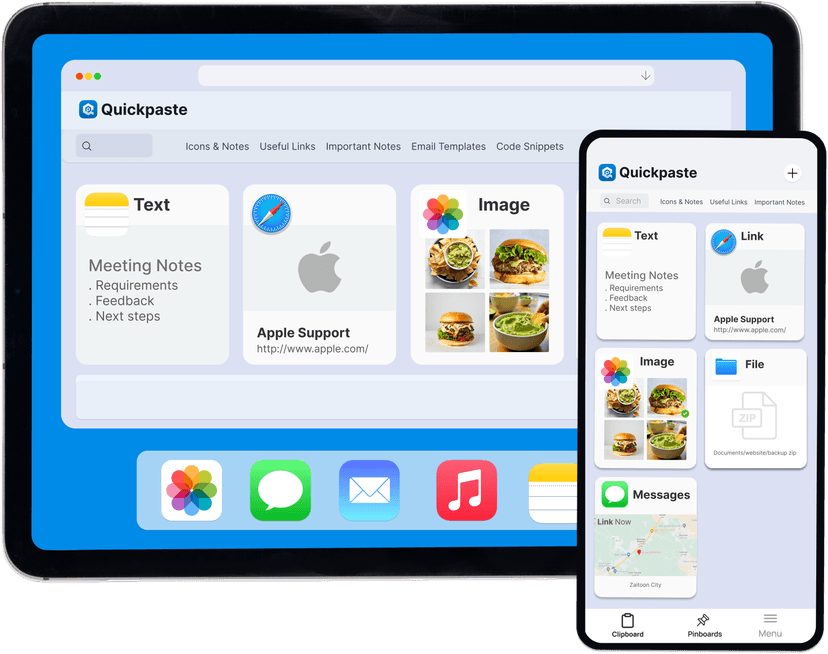

iCloud Sync
Copy on iPhone, paste on iPad or Mac all through iCloud.

Face ID Lock
Face ID keeps your clipboard history visible to you alone

Works Across All Apps
Paste anything you've copied without leaving the app
How does a clipboard manager work on iPhone?
A clipboard manager for iPhone works by saving everything you copy into a persistent history list on your device. QuickPaste does this through two native iOS features, the Share Sheet Action Extension captures what you copy, and the keyboard extension gives you instant access while typing in any app. Tap any saved clip once to paste it. No switching apps, no retyping, no lost data.
Why iPhone Needs a Clipboard Manager?
iPhone's default clipboard holds one item at a time. Every time you copy something new, the previous item is permanently overwritten and lost. A clipboard manager fixes this by saving your full copy history, so nothing you copy ever disappears again.
The Solution
Copy multiple messages, replies, and links without losing any of them
Save every link, reference, and URL you copy, search and reuse them any time
Store templates, saved replies, and repeated text, paste them in one tap instead of retyping
Work across WhatsApp, Gmail, Safari, and Slack without switching apps to copy-paste
Access your full clipboard history on iPhone, iPad, and Mac through iCloud sync
What features does QuickPaste clipboard manager offer?
QuickPaste saves your clipboard history, text, images, and links, searchable and accessible from any app through a keyboard extension.
Reuse saved clipboard items across every iPhone app without switching screens
Store text, images, and links together in one searchable clipboard list
Paste any saved item directly from the QuickPaste keyboard extension, no app switching
Organise frequently used replies, templates, and links into your clipboard history
Protect your clipboard history with Face ID, passwords and OTPs stay private
Clipboard data never leaves your device stored locally, never on external servers
Sync clipboard history across iPhone, iPad, and Mac securely through iCloud
Free to download, no subscription, no account, no setup required
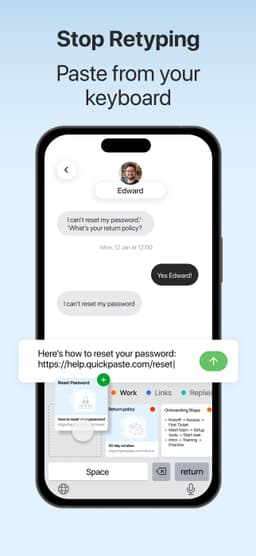
How Clipboard Manager Works?
Instead of copying the same content repeatedly, users can store and reuse it with one tap. See how
Enable Action Extension for Limitless Copying
Turn on the Quick Paste Action Extension to save anything instantly. Select any text or image → tap Share → choose Copy to Quick Paste.
Use the Paste Keyboard Anywhere
While typing, long-press the language switch key → select Quick Paste → view saved clips → tap any item to paste instantly.
Who needs a clipboard manager on iPhone?
Content Creators & Marketers
Plan captions, hashtags, CTAs, and campaign links once, then paste them anywhere in seconds. Spend less time switching between Notes and social apps so you can publish faster.
Students
Save quotes, references, and notes while studying without breaking your focus. Paste everything into your assignments or notes when you're ready.
Developers
Store reusable code snippets, terminal commands, and test data for quick access. Reduce repetitive typing and speed up development workflows.
Sales & Support
Save canned responses, pricing details, product links, and FAQs for one-tap access. Respond to customers consistently and reduce the time spent typing the same answers.
Freelancers & Professionals
Keep proposals, email templates, meeting links, invoices, and client messages ready to paste. Handle recurring tasks more efficiently and stay productive throughout the day.
Business Owners & Teams
Store SOPs, frequently shared information, internal resources, and common messages in one place. Share consistent information faster across your business.
Why Choose Quick Paste?
Features | quick paste | default ios clipboard | other apps |
|---|---|---|---|
| clipboard history list | |||
| saves multiple copied items | |||
| supports text and images | Last Item Only | ||
| reuse saved clipboard items | |||
| paste without switching apps | |||
| face id lock for clipboard data | |||
| no account required | |||
| no mandatory cloud sync | |||
| private focused clipboard storage | basic | ||
| light weight clipboard utility |
Reviews
Alex
Feb 5, 2026
"Best clipboard app I've used so far. Everything feels structured and quick to access. Clean, fast, and really helpful for daily work."
FAQs
QuickPaste saves every item you copy into a local clipboard history on your iPhone. Access your full history from the QuickPaste keyboard extension while typing in any app, without switching screens
No. QuickPaste adds a keyboard extension to your iPhone. Switch to it while typing and tap any saved clip to paste instantly
Yes. QuickPaste stores everything locally on your iPhone. Nothing uploads to any server. Lock your history with Face ID for extra protection
Yes. QuickPaste is free on the App Store. No subscription, no account, no cloud sync required.
Yes. QuickPaste runs entirely on your device. Clipboard history is available offline at all times
Yes. QuickPaste stores all clipboard data locally on your iPhone. Nothing is sent to any server, ever. Face ID adds a second layer of protection.
Stop losing what you copy on iPhone.
QuickPaste saves your clipboard history, protects it with Face ID, and puts it inside your keyboard free, no account required.
Download QuickPaste FreeHave a question?
Send us a message, we'll get back to you as soon as we can.